How to Reset Winchester Gun Safe and Restore Access Quickly
Getting locked out of a safe can turn into a stressful experience, especially when important belongings are stored inside. Many owners look for clear instructions on how to reset winchester gun safe settings after battery issues, forgotten codes, or keypad malfunctions. Understanding the correct reset process helps keep the safe secure while avoiding unnecessary damage or service costs.
Modern Winchester safes are designed with digital locking systems that make access convenient and reliable. Over time, users may need to change the passcode to improve security or restore the factory settings after repeated entry errors. Learning how to reset winchester gun safe models properly can save time and prevent frustration during emergencies.
Every safe model works a little differently, which makes it important to follow the right steps for your specific unit. Resetting the keypad usually involves locating the reset button, entering the current code, and programming a new combination carefully.
This guide explains the basic reset process, common problems, and useful tips to help maintain safe performance and security for long-term use.
What You Need Before Resetting a Winchester Gun Safe
Resetting a Winchester gun safe becomes much easier when you prepare everything ahead of time. Many safe owners rush into the process and later realize they are missing important details like the current access code, backup key, or fresh batteries. Taking a few minutes to gather the right tools and information helps avoid lockouts, keypad errors, and unnecessary frustration during the reset process.
Gather the Current Access Code and Backup Key
Before starting the reset process, make sure you have the existing access code for the safe. Most Winchester gun safes require the current combination before allowing users to program a new code. Without the original code, the reset procedure may become more difficult and could require contacting customer support for assistance. Writing the code down temporarily in a secure place can help reduce mistakes while entering it during the reset steps.
The backup key is equally important because it provides emergency access when the keypad fails or batteries stop working. Many safe owners forget where the override key is stored until they actually need it. Keeping the key nearby before beginning the reset process saves time and prevents panic during unexpected lock issues.
You should also verify that the keypad responds properly before changing any settings. A weak or unresponsive keypad may interrupt the reset process and create additional problems. Checking these details early helps create a smoother and safer reset experience.
Install Fresh Batteries Before Starting
Low battery power is one of the most common reasons digital safe locks stop functioning correctly. Before resetting a Winchester gun safe, replace the old batteries with a fresh, high-quality set recommended by the manufacturer. Weak batteries can cause delayed keypad responses, failed code entries, or incomplete reset attempts that may temporarily lock the safe system.
Battery compartments are usually located behind the keypad or inside the safe door panel. Carefully inspect the compartment for corrosion, loose connections, or damaged terminals before inserting the new batteries. Cleaning the contacts gently can improve the keypad’s performance and prevent power interruptions during programming.
Many users overlook battery quality and use cheaper options that drain quickly. Reliable alkaline batteries generally provide more stable power for electronic locking systems. Once the new batteries are installed, test the keypad several times to confirm the safe powers on consistently before beginning the reset steps.
Keep the Owner’s Manual Nearby
The owner’s manual contains valuable information that can make resetting the safe much easier. Winchester gun safe models often have different keypad layouts, programming methods, and reset instructions depending on the manufacturing year and lock type. Having the manual nearby helps you follow the exact procedure designed for your specific model.
The manual may also include factory reset instructions, troubleshooting tips, and warnings about incorrect code entry attempts. Reading these details beforehand can prevent accidental lockouts or system delays. Many electronic safes activate temporary security lock modes after several failed attempts, which can slow down the reset process significantly.
When the original manual is missing, users can often locate a digital version through the manufacturer’s website using the model number. Taking time to review the instructions carefully reduces confusion and helps ensure the reset process works properly from start to finish.
How to Reset Winchester Gun Safe Step by Step
Resetting a Winchester gun safe requires patience and careful attention to each step. Many electronic safe locks are designed with built-in security protections that prevent accidental changes or unauthorized access. Following the correct sequence helps avoid lockouts and programming errors. Understanding the process beforehand also makes it easier to change your access code while keeping your valuables secure and protected.
Open the Safe Using the Current Code
The first step in resetting a Winchester gun safe is opening the safe with the existing access code. Enter the current combination slowly and carefully to avoid triggering keypad errors. Most Winchester safes allow only a limited number of failed attempts before activating a temporary lockout mode. Waiting through a security timeout can delay the reset process and create unnecessary frustration.
Once the safe door opens, keep it unlocked throughout the entire reset procedure. This precaution helps prevent accidental lockouts while testing the new code later. Many users make the mistake of closing the safe too early before confirming the updated combination works properly. Keeping the door open allows you to verify the programming safely without risking access problems.
You should also inspect the locking bolts and keypad while the safe remains open. Smooth bolt movement and responsive keypad buttons indicate the system is functioning correctly before starting the reset steps.
Locate the Reset Button Inside the Safe
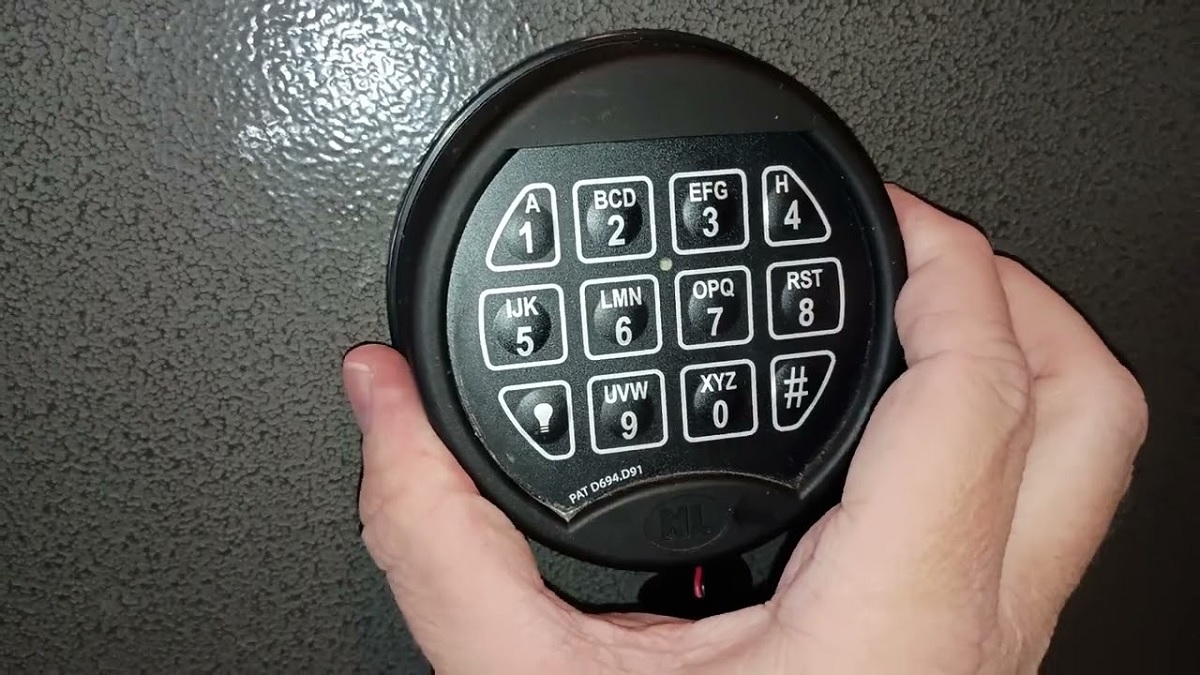
Most Winchester electronic safes include a reset button placed on the interior side of the door near the keypad housing. The button is usually small and may appear red, black, or recessed depending on the safe model. Checking the owner’s manual can help identify the exact location for your specific Winchester safe.
Pressing the reset button typically activates programming mode. Many safes produce a beep or flashing light to confirm the keypad is ready for a new code entry. During this stage, it is important to avoid pressing random buttons because incorrect inputs can interrupt the programming process or cancel the reset mode entirely.
Some models require holding the reset button for several seconds before the keypad responds. Others may need the existing code entered again after pressing the button. Reading the instructions carefully helps prevent confusion during this important stage of the reset process.
The safe should remain open and unlocked while programming continues. This provides a safer environment for testing the newly created access code afterward.
Enter and Save a New Access Code
After activating reset mode, the next step involves entering a new personal access code. Most Winchester safes support three- to eight-digit combinations depending on the lock model. Choose a code that feels easy to remember but difficult for others to guess. Avoid common combinations such as birthdays, repeating numbers, or simple patterns.
Carefully enter the new code using the keypad. Many Winchester safes require pressing a confirmation key like “#” or “*” after the code is entered. A beep or indicator light often confirms the new combination has been accepted successfully. Moving too quickly during this process can cause typing mistakes that lead to programming errors.
Some safes may request the new code a second time for verification purposes. Re-enter the same combination exactly as before to complete the reset process properly. Writing the new code in a secure location temporarily can help avoid forgetting it during the first few days after resetting the safe.
Pay close attention to every keypad response because unusual beeps or flashing lights may indicate an incorrect entry that requires restarting the programming process.
Test the New Code Several Times
Testing the new access code is one of the most important steps after resetting a Winchester gun safe. With the safe door still open, enter the new combination multiple times to confirm the lock responds consistently. The locking bolts should retract smoothly without hesitation or unusual keypad delays.
Repeated testing helps identify programming mistakes before the safe door closes completely. Some users skip this step and discover later that the new code was entered incorrectly during setup. Performing several successful test openings reduces the risk of becoming locked out unexpectedly.
During testing, listen for warning sounds or error beeps that may signal low battery power or incomplete programming. Replacing weak batteries at this stage can help prevent future lock issues. You should also confirm that the backup key still functions properly after the reset process.
Once the new code works consistently, close the safe door carefully and test the combination again with the door fully locked. Successful operation confirms the reset process has been completed correctly and the safe is ready for normal use.
How to Reset a Winchester Gun Safe Without the Current Code
Forgetting the current code of a Winchester gun safe can create a stressful situation, especially when important documents or valuables are stored inside. Many safe owners face this issue after long periods without use or after inheriting a safe from someone else. Understanding the available recovery options helps restore access safely while protecting the locking system from unnecessary damage or permanent malfunction.
Use the Backup Key to Open the Safe
Most Winchester gun safes include an emergency override key that allows access when the electronic code is unavailable. This backup key is one of the safest and fastest ways to regain entry without knowing the current combination. The key slot is often hidden behind the keypad or a removable cover on the front of the safe door.
Carefully insert the override key and turn it slowly according to the manufacturer’s instructions. Once the locking mechanism releases, open the safe door completely and keep it unlocked during the reset process. This helps prevent accidental lockouts while creating a new access code.
Many owners forget where the emergency key is stored until an issue occurs. Keeping the backup key in a secure but accessible location can save time during future emergencies. After opening the safe, you can usually locate the internal reset button and program a new combination without needing the previous code again.
Check the Owner’s Manual for Factory Reset Instructions
Different Winchester gun safe models may follow different reset procedures, especially older and newer electronic lock systems. The owner’s manual often contains important information about factory reset options, override methods, and keypad programming instructions. Reviewing these details carefully helps avoid unnecessary mistakes during the recovery process.
Some safes include a default factory code or a specific recovery sequence designed for authorized owners. Others may require serial number verification before allowing advanced reset procedures. The manual may also explain how many failed code attempts trigger temporary security lockouts.
Reading the instructions before pressing buttons randomly can protect the keypad system from programming errors. Incorrect attempts sometimes disable the lock temporarily, making the recovery process more difficult. Taking time to understand the recommended procedure increases the chances of restoring access safely and successfully.
When the original manual is unavailable, many users search for digital copies through the manufacturer’s support resources using the safe’s model information.
Replace Weak Batteries Before Attempting a Reset
Battery problems are often mistaken for forgotten code issues. A weak battery can prevent the keypad from responding correctly, produce delayed signals, or trigger repeated error beeps during code entry attempts. Replacing the batteries before attempting a reset can sometimes restore normal operation without requiring advanced recovery methods.
Use fresh, high-quality alkaline batteries recommended for electronic safe locks. Carefully inspect the battery compartment for corrosion, dirt, or loose terminals that may interrupt power flow. Cleaning the contacts gently can improve keypad performance and reduce electronic malfunctions during programming.
After installing new batteries, test the keypad several times to confirm it responds consistently. Some Winchester safes may regain proper functionality immediately after power restoration. This simple step is often overlooked, yet it can solve many access issues without needing professional assistance or complicated reset procedures.
Stable battery power also helps prevent interruptions while entering a new access code after successfully opening the safe.
Contact Winchester Customer Support for Assistance
When the current code and backup key are both unavailable, contacting Winchester customer support may become necessary. Customer service representatives can often guide verified owners through recovery steps based on the safe model and serial number. Proof of ownership is commonly required before reset assistance is provided for security reasons.
Support teams may explain model-specific reset methods, replacement key options, or electronic lock troubleshooting steps. In some situations, they may direct users to certified locksmith services that specialize in safe recovery procedures. Professional assistance helps reduce the risk of damaging the lock system during forced entry attempts.
Trying to drill, pry, or force open the safe without proper knowledge can permanently damage the locking mechanism and compromise security. Seeking authorized assistance provides a safer and more reliable solution for regaining access when other reset methods no longer work properly.
How to Change Batteries in a Winchester Gun Safe
Changing the batteries in a Winchester gun safe is an important part of maintaining reliable keypad performance and secure access. Weak batteries can cause delayed responses, keypad beeping, or complete lock failure at inconvenient times. Replacing the batteries regularly helps keep the electronic locking system functioning properly while reducing the risk of getting locked out unexpectedly during daily use.
Identify Signs of Weak or Dead Batteries
Most Winchester gun safes provide warning signs before the batteries completely fail. Common symptoms include dim keypad lights, delayed button responses, repeated error beeps, or the lock requiring multiple attempts before opening. Recognizing these early signs allows you to replace the batteries before the safe becomes difficult to access.
Some electronic lock systems also produce a low-battery warning sound each time the keypad activates. Ignoring these alerts may eventually lead to total power loss, making emergency access more complicated. Many users wait until the safe stops responding entirely, which increases stress and can create unnecessary access problems.
Battery life varies depending on usage frequency and battery quality. Regular testing of the keypad and lock operation helps detect power issues early. Replacing batteries once or twice each year is often recommended for consistent safe performance and long-term electronic reliability.
Locate the Battery Compartment Safely
The battery compartment on most Winchester gun safes is usually positioned behind the electronic keypad or inside a removable front panel. Some models allow easy access from the exterior, while others may require opening the safe door before reaching the battery housing. Checking the owner’s manual can help identify the exact location for your specific model.
Before removing the old batteries, make sure the safe door remains open and unlocked. This precaution prevents accidental lockouts during the replacement process. Many safe owners overlook this step and risk losing access when power is disconnected temporarily.
Carefully inspect the compartment for dust, corrosion, or loose battery terminals. Dirty or damaged contacts can interrupt electrical flow and affect keypad performance even after installing new batteries. Cleaning the compartment gently with a dry cloth helps maintain stable power connections and improves the reliability of the electronic lock system.
Install Fresh Batteries Correctly
Use fresh, high-quality alkaline batteries recommended by the manufacturer for the best performance. Avoid mixing old and new batteries because uneven power levels can create inconsistent keypad operation. Installing batteries incorrectly may also prevent the safe from powering on properly after replacement.
Check the positive and negative markings inside the battery compartment before inserting the new batteries. Aligning them correctly ensures proper electrical contact and prevents damage to the keypad system. Once installed, close the compartment securely so the batteries remain stable during normal safe operation.
After replacing the batteries, test the keypad immediately while the safe door stays open. Enter the access code several times to confirm the lock responds consistently and the bolts retract smoothly. Reliable keypad performance after installation usually indicates the batteries were inserted properly and the lock system is receiving stable power again.
Test the Safe After Battery Replacement
Testing the safe thoroughly after changing the batteries helps confirm everything functions correctly before returning to normal use. Start by entering the access code multiple times with the door open. Watch for fast keypad response times, clear indicator lights, and smooth lock operation during each test.
You should also listen for unusual warning beeps or delayed responses that could signal weak connections or installation issues. Rechecking the battery placement may solve minor performance problems immediately. Many users skip repeated testing and later discover the keypad becomes unreliable after the safe door is fully closed.
The backup key should also be tested occasionally to ensure emergency access remains available during future battery failures. Regular battery maintenance and testing help extend the lifespan of the electronic locking system while keeping the safe dependable for everyday security needs.
Common Problems When Resetting a Winchester Gun Safe
Resetting a Winchester gun safe can sometimes become frustrating when unexpected problems appear during the process. Electronic lock systems rely on proper power, correct code entry, and responsive keypad functions to operate smoothly. Small mistakes or overlooked issues may interrupt the reset procedure and temporarily prevent access. Understanding the most common problems can help safe owners avoid delays and complete the reset process more successfully.
Incorrect Code Entry During Programming
One of the most common problems during a safe reset is entering the wrong code while programming a new combination. Many Winchester gun safes require precise keypad input, and even a small mistake can cancel the reset process or trigger an error warning. Pressing buttons too quickly may also cause the keypad to miss certain numbers during entry.
Some users accidentally choose complicated combinations that become difficult to remember immediately after programming. This often leads to repeated failed attempts and temporary lockout periods designed to protect the safe from unauthorized access. Entering the code slowly and carefully can reduce these problems significantly.
Testing the new code several times while the safe door remains open is extremely important. Skipping this step increases the risk of getting locked out after closing the safe. Writing the new combination in a secure temporary location can also help avoid confusion during the first few days after resetting the system.
Weak Batteries Causing Reset Failures
Battery issues are another major reason Winchester gun safe resets fail unexpectedly. Weak batteries may provide enough power for basic keypad lighting but not enough energy to complete the full programming process. This can lead to delayed responses, incomplete resets, or repeated keypad error sounds during setup.
Many safe owners attempt a reset without replacing old batteries first. As battery power drops, the keypad may freeze, respond slowly, or reject code entries even when the information is correct. Installing fresh alkaline batteries before beginning the reset process helps create more stable lock performance.
Battery compartment corrosion can also interfere with electrical connections and prevent proper communication between the keypad and locking mechanism. Cleaning the terminals gently and checking for loose connections can improve system reliability. Testing the keypad several times after installing new batteries helps confirm the electronic lock is functioning normally before continuing the reset procedure.
Trouble Finding the Reset Button
Many Winchester safe owners struggle to locate the reset button because its placement varies by model. The button is usually positioned on the interior side of the safe door near the electronic lock housing, but some models place it behind panels or recessed areas that are difficult to notice immediately.
Without the owner’s manual, users may waste time pressing random keypad buttons hoping to activate reset mode. This can accidentally trigger security lockouts or cancel programming attempts. Carefully inspecting the inside of the safe door often helps identify the correct button location more quickly.
Some reset buttons are very small and require a pen tip or narrow object to press properly. Others need to be held down for several seconds before the keypad enters programming mode. Reading model-specific instructions beforehand reduces confusion and makes the reset process smoother and more efficient.
Keeping the safe open during the search also prevents accidental lockouts while troubleshooting the keypad system.
Keypad Malfunctions and Security Lockouts
Electronic keypad problems can make resetting a Winchester gun safe much more difficult. Over time, keypad buttons may wear out, become unresponsive, or register incorrect inputs. Dirt, moisture, or physical damage can also interfere with normal keypad performance during programming attempts.
Repeated incorrect code entries often trigger temporary security lockouts designed to prevent unauthorized access. During these lockout periods, the keypad may stop responding completely for several minutes. Many users mistakenly believe the safe is permanently broken when the system is simply following its built-in security delay.
Waiting patiently for the lockout timer to expire usually restores keypad functionality. Avoiding repeated button pressing during this time can prevent additional delays. Testing each keypad button carefully after the reset process helps identify signs of future electronic issues before they become serious access problems later on.
Tips to Keep Your Winchester Gun Safe Secure
Keeping a Winchester gun safe secure involves more than simply locking the door after use. Regular maintenance, proper code management, and careful placement all play important roles in protecting firearms and valuable belongings. Small security habits can greatly reduce the risk of unauthorized access, electronic lock problems, and long-term damage while helping the safe remain reliable for everyday use.
Use a Strong and Unique Access Code
Choosing a strong access code is one of the most effective ways to improve safe security. Simple combinations such as birthdays, repeating numbers, or easy patterns can make unauthorized access easier. A unique code that is difficult to guess provides stronger protection and reduces the chances of someone opening the safe without permission.
Many safe owners use the same code for multiple devices, which increases security risks. Creating a separate code specifically for the Winchester gun safe helps improve overall protection. It is also helpful to avoid sharing the code with unnecessary individuals, especially through text messages or written notes placed near the safe.
Changing the access code occasionally can add another layer of security. Regular updates reduce the risk of old codes being discovered or remembered by others. After creating a new combination, testing it multiple times helps confirm the lock system accepts the updated code correctly.
Keep the Safe in a Secure Location
The location of the safe can significantly affect its overall security. Placing a Winchester gun safe in a hidden or less noticeable area makes it harder for unauthorized individuals to find quickly. Many owners install safes inside closets, storage rooms, or reinforced areas to improve protection against theft attempts.
Bolting the safe securely to the floor or wall adds extra stability and makes removal more difficult. Large safes may still become targets when left unsecured in open spaces. Proper installation helps prevent thieves from attempting to move the entire safe for forced entry later.
The surrounding environment also matters for long-term safe performance. Areas with high moisture or extreme temperature changes may damage electronic components and locking systems over time. Keeping the safe in a dry and stable environment helps protect both the safe itself and the valuables stored inside.
Replace Batteries and Inspect the Keypad Regularly
Electronic lock systems depend on stable battery power for reliable performance. Weak batteries can lead to keypad delays, failed code entries, or sudden lockouts during normal use. Replacing the batteries regularly helps maintain consistent operation and reduces the chance of access problems at inconvenient times.
Checking the keypad for signs of wear or damage is equally important. Sticky buttons, delayed responses, or unusual beeping sounds may indicate developing electronic issues. Addressing these problems early can prevent larger lock malfunctions later on.
Many users wait until the keypad stops responding before changing batteries, which can create stressful situations. Installing fresh alkaline batteries once or twice each year helps maintain steady power. Testing the keypad occasionally after battery replacement ensures the lock system continues functioning correctly and securely.
Store Backup Keys and Documents Safely
Backup keys and safe documentation should always be stored in a secure location separate from the safe itself. Keeping the override key inside or near the safe defeats its emergency purpose and increases security risks. A protected drawer, lockbox, or trusted storage area works better for emergency access items.
Important information such as the safe model number, serial number, and owner’s manual should also remain accessible when needed. These details become useful during troubleshooting, warranty claims, or customer support requests. Having this information ready can speed up recovery during lock or keypad problems.
Avoid labeling backup keys directly with the safe name or location because this may create additional security concerns. Organizing emergency access items carefully helps ensure the safe remains protected while still allowing quick access during unexpected lock failures or forgotten code situations.
FAQs
How Do You Reset A Winchester Gun Safe Code?
You can reset your Winchester gun safe code by first opening the safe and keeping the door open during the entire process. This step prevents accidental lockouts while you program a new code. Most Winchester safes include a reset button located on the inside of the door near the keypad or battery compartment. After pressing the reset button, the keypad usually beeps or flashes to indicate programming mode.
You should then enter your new passcode carefully and press the confirmation key according to your model instructions. After saving the code, test it several times with the door still open. This helps you confirm the new combination works properly before securing the safe again. A strong and memorable code improves both convenience and protection.
Can You Reset A Winchester Gun Safe Without The Original Code?
Yes, you can reset a Winchester gun safe without the original code if you still have access to the backup override key. Many Winchester electronic safes come with emergency keys that allow you to unlock the safe when the keypad code is forgotten or stops working. Once opened, you can usually press the internal reset button and create a new passcode.
If you do not have the override key, you may need to contact the manufacturer for assistance. They often require proof of ownership and the safe’s serial number before helping with recovery options. Keeping your backup keys in a secure but accessible place can save time and reduce stress during emergencies.
Why Is My Winchester Gun Safe Not Accepting The New Code?
Your Winchester gun safe may reject the new code if the programming steps were not completed correctly. Sometimes users press the wrong confirmation button or enter the code too slowly during setup. Weak batteries can also interrupt the programming process and prevent the lock from saving the updated combination properly.
You should replace the batteries with fresh, high-quality ones before attempting another reset. Carefully follow the instructions for your specific Winchester safe model because keypad layouts and programming sequences may differ slightly. After entering the new code, test it several times while the safe door remains open to ensure the lock recognizes the updated settings.
Where Is The Reset Button On A Winchester Gun Safe?
The reset button on a Winchester gun safe is usually located inside the safe near the electronic lock or battery compartment. In many models, you can find a small red or black button attached to the back side of the keypad housing. You often need to fully open the door to access it safely.
After locating the button, press and hold it until the keypad beeps or the indicator light changes color. That signal means the safe has entered programming mode. Since reset button locations can vary between models, checking the owner’s manual can help you avoid confusion and complete the reset process more quickly and safely.
How Long Does It Take To Reset A Winchester Gun Safe?
Resetting a Winchester gun safe usually takes only a few minutes when you have the correct code or backup key available. The process mainly involves opening the safe, pressing the reset button, entering a new code, and testing the lock. Most users can finish the entire procedure within five to ten minutes.
The time may increase if the keypad batteries are dead or if you are unsure about your safe model instructions. Reading the programming guide before starting can make the process smoother and reduce mistakes. You should never rush while entering a new code because incorrect inputs can temporarily lock the keypad for security reasons.
What Should You Do If The Winchester Safe Keypad Stops Working?
If your Winchester safe keypad stops working, the first thing you should check is the battery condition. Weak or dead batteries are one of the most common reasons electronic keypads fail to respond. Replacing them with fresh alkaline batteries often restores normal function immediately and allows you to continue using or resetting the safe.
You should also inspect the keypad for loose connections, moisture, or physical damage. If the keypad still does not respond after changing batteries, use the backup override key to access the safe if available. Persistent issues may require professional repair or customer support assistance to prevent permanent locking problems.
Is It Safe To Change Your Winchester Gun Safe Code Regularly?
Yes, changing your Winchester gun safe code regularly can improve security and reduce the risk of unauthorized access. Updating the code every few months helps protect your valuables, especially if multiple people know the existing combination. It also lowers the chances of someone guessing or memorizing your old code over time.
When choosing a new combination, avoid simple patterns, repeated numbers, or personal details like birthdays. You should select a code that is easy for you to remember but difficult for others to predict. After changing the code, always test it several times before closing the safe to ensure everything works correctly.
Conclusion
Keeping your safe working properly becomes much easier when you understand the correct reset process and basic maintenance steps. Learning how to reset winchester gun safe systems can help prevent lockouts, improve security, and keep the electronic keypad functioning reliably for everyday use.
Regular battery replacement, careful code management, and proper testing after programming are all important parts of maintaining a secure safe. Small precautions like storing backup keys safely and checking the keypad for warning signs can reduce future problems and extend the lifespan of the locking system.
Many safe owners feel stressed when dealing with forgotten codes or keypad issues, but following the correct steps can make the process smoother and safer. Knowing how to reset winchester gun safe models properly also helps protect valuable belongings while ensuring quick and dependable access whenever needed.